10 Best AI Avatar Video Generators for Business Communication
TL;DR
- Pick an avatar tool for the whole communication workflow. A face that looks good in a demo is only one requirement.
- Independent studies with 561, 500, and 83 participants suggest presenter modality alone does not determine message or learning outcomes. Perceived humanness, script quality, and context still matter.
- ngram ranks first for teams that need an avatar inside a source-grounded business video. HeyGen and Synthesia are stronger avatar-first choices.
- Run one real-script pilot and check revision effort, pronunciation, consent, and screen-sharing before buying.
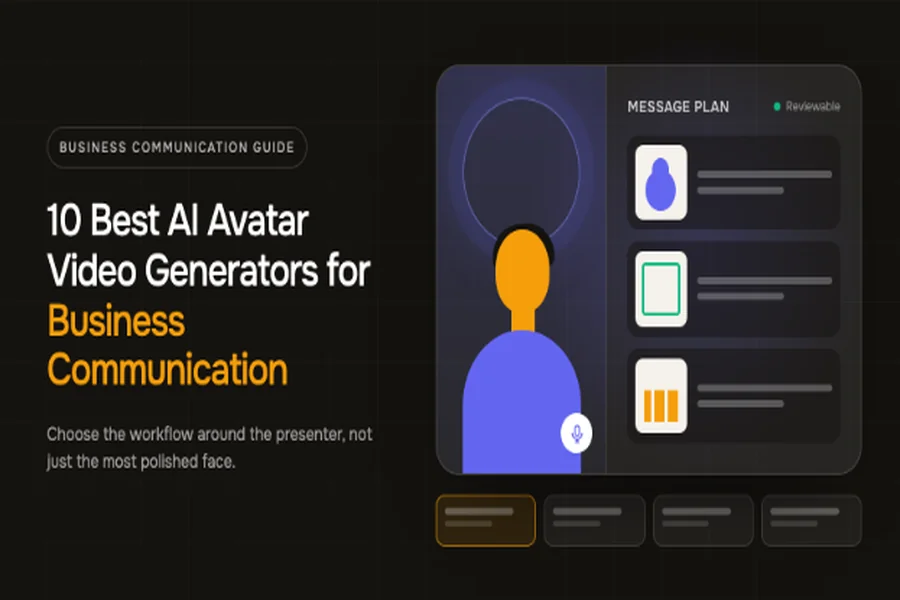
Alt text: Abstract editorial banner showing a digital presenter beside a business storyboard and communication channels – AI avatar video generators for business communication
A digital presenter beside a reviewable business-video storyboard, created for this guide.
Visual credit: Original editorial illustration created for this article.
Choosing an AI avatar video generator used to mean picking the least robotic talking head. That is no longer enough. The serious products now offer personal avatars, voice cloning, translation, brand controls, and some form of AI-assisted editing. The difference shows up after the impressive demo, when a product screen changes, legal rewrites one sentence, or a regional team needs the same message in another language.
That is why this ranking looks beyond facial realism. A business video must carry a message, show evidence, survive review, and remain editable after the first render. An avatar can be the host, but it should not cover the product interface, diagram, process, or data that the viewer came to understand.
The ten tools below fit different versions of that job. ngram is first for source-grounded business communication where the presenter is one part of a planned video. HeyGen and Synthesia remain strong avatar-first platforms. Colossyan and AI Studios lean into structured training and broad presenter choice. D-ID, Elai.io, VEED, Canva, and Vyond each make sense when a different surrounding workflow matters more.
The ranking uses current public product information checked in August 2026. It does not claim private account testing or compare subjective realism from hand-picked vendor demos. Instead, it asks a more durable question: what can a business team verify before it commits its scripts, identities, and production calendar to the platform?
What is an AI avatar video generator?
An AI avatar video generator is a specialized script to video generator that turns a prompt or source document into a video presented by a synthetic or digitally recreated person. The software pairs a stock or custom avatar with generated speech and lip movement, then places that presenter inside scenes containing text, images, product footage, or other visual material.
That description separates avatar platforms from cinematic text-to-video systems. A scene generator such as Sora or Runway creates shots and motion from a prompt. An avatar video maker creates a repeatable presenter who can deliver precise business language. Some products now combine both approaches, but the operational difference still matters.
Business teams usually reach for avatars when filming is the bottleneck rather than the message. Common jobs include employee training, customer onboarding, product explanation, executive updates, localized announcements, sales outreach, and short marketing videos. A focused AI training video generator can make recurring lessons easier to update, but the strongest use cases still value repeatability and clarity over synthetic spectacle.
The weakest use case is a long talking head that reads information better shown on screen. A digital presenter should earn screen time. If the viewer needs to see a dashboard, a safety procedure, a chart, or a sequence of clicks, the avatar should introduce the point and then make room for the evidence.
How we selected the best AI avatar video generators for business
This list starts with the work surrounding the avatar. The face matters, but a team will spend more time revising scripts, replacing screens, checking names, approving translations, and exporting versions than choosing a stock presenter.
Source material and message planning
A blank script box is fine when the words are already approved. It is limiting when the real source is a policy, deck, release note, URL, or screen recording. We gave more weight to products that can organize business material into a reviewable script or scene plan before a costly render.
This criterion also changes the risk profile. When every claim traces back to supplied material, reviewers can focus on framing and accuracy. When a generator improvises freely, someone must check whether the polished presenter is confidently saying something the source never supported.
Presenter choice and identity control
Ready-made avatar libraries reduce setup time. Personal or custom avatars create continuity for an executive, trainer, or brand spokesperson. Neither is automatically better.
A stock avatar works when the presenter is a neutral guide. A personal avatar works when identity itself carries trust, but it also raises questions about consent, account permissions, future use, and what happens when the employee leaves. A useful platform should make the choice explicit rather than treating every face as interchangeable decoration.

Alt text: Horizontal bar chart comparing published ready-made avatar library sizes across seven platforms, from 50 to more than 2,000
Published minimum ready-made avatar counts on current official product pages, checked August 2026. Counts are not quality ratings, and vendors use different definitions for stock, studio, generated, and configurable avatars.
Source: Current official vendor product and pricing pages, checked August 2026.
| Platform | Published ready-made avatar count |
| AI Studios | 2,000+ |
| Vyond | 1,300+ |
| HeyGen | 500+ |
| Colossyan | 300+ |
| Synthesia | 240+ |
| Elai.io | 80+ |
| VEED | 50+ |
The spread is large, but more faces do not guarantee a better fit. Review full clips, not thumbnails. Check whether the presenter can hold a consistent look across scenes, whether gestures suit the tone, and whether the library represents the audiences and roles in your communication plan.
Language, voice, and pronunciation
Language counts make an attractive headline, yet they combine several different capabilities. A platform may support translated captions in more languages than cloned voices. Lip sync may work across a subset. Accent selection, pronunciation control, and human review can matter more than the top-line number for a technical or regulated message.
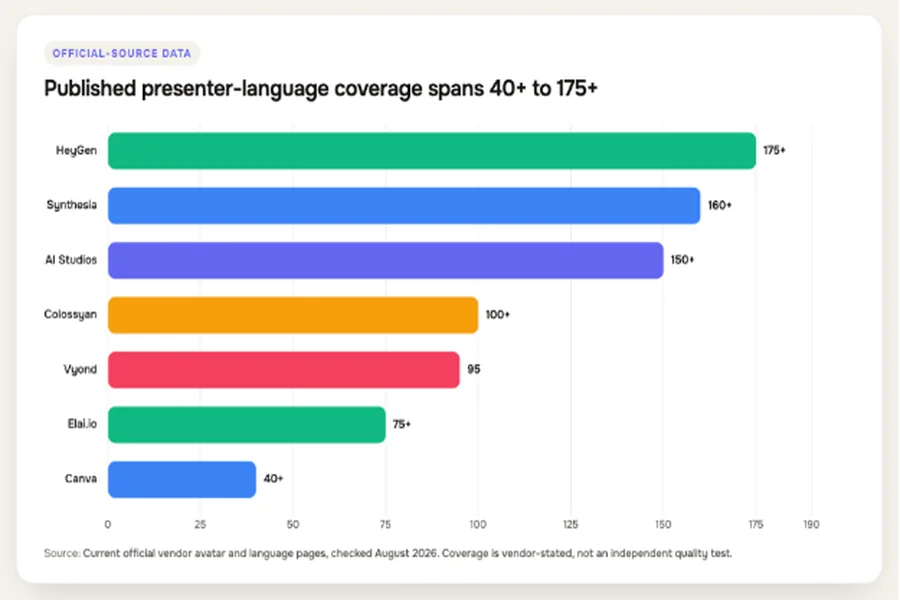
Alt text: Horizontal bar chart of vendor-stated presenter language coverage, from 40-plus to 175-plus
Vendor-stated language or language-and-accent coverage for avatar or presenter delivery on current official pages, checked August 2026. Figures describe published coverage, not independently measured translation quality.
Source: Current official vendor avatar and language pages, checked August 2026.
| Platform | Vendor-stated coverage |
| HeyGen | 175+ |
| Synthesia | 160+ |
| AI Studios | 150+ |
| Colossyan | 100+ |
| Vyond | 95 |
| Elai.io | 75+ |
| Canva | 40+ |
For a global team, ask for one sample containing names, acronyms, product terms, numbers, and a sentence with deliberate emphasis. Then let a fluent reviewer judge it. A broad language menu is useful only when the final delivery sounds appropriate to the market.
Visual storytelling beyond the presenter
Most business messages need proof on screen. Product teams need screenshots and recordings. Trainers need diagrams, steps, and examples. Marketing teams need product footage, brand assets, captions, and channel-specific framing.
We ranked complete scene workflows above isolated talking-head generators. The winning product should let the avatar introduce, annotate, or summarize the material without forcing the presenter to occupy every frame.
Revision, collaboration, and governance
The first render is not the finish line. Check whether a teammate can comment, whether one scene can be changed without rebuilding the video, whether translations remain connected to the source version, and whether brand assets are managed centrally.
Governance belongs in the buying criteria too. A custom face or cloned voice needs explicit consent, restricted access, and an owner. Viewers may also need disclosure that the presenter is synthetic. Those decisions are easier to make before the first executive avatar appears in a live campaign.
What the official product pages reveal about the category
We audited the ten fixed products against seven questions on August 18, 2026. Does the current official material document script or prompt input, ready-made presenters, a personal or custom avatar, multilingual delivery, brand or design controls, broader editing or supporting visuals, and an interactive or scenario capability?
A capability counted only when a current official source stated it. The audit did not infer features from screenshots, old reviews, or category expectations. ngram was checked against its current product-state document; the other nine products were checked against their official product or help pages.
This method has a deliberate limit: it measures documented workflow coverage, not output quality. Seven documented dimensions do not make one tool “better” than another. A product can cover fewer dimensions and still be the right specialist for a specific job.
Alt text: Horizontal bar chart showing how many of seven business workflow dimensions each official product source documents
Official-source workflow audit across seven documented dimensions, completed August 18, 2026. This is documentation coverage, not a product score or hands-on benchmark.
Source: Original editorial audit of current official product, help, and product-state sources.
| Tool | Documented workflow dimensions out of 7 |
| ngram | 7 |
| HeyGen | 6 |
| Synthesia | 7 |
| Colossyan | 7 |
| AI Studios | 7 |
| D-ID | 5 |
| Elai.io | 7 |
| VEED | 5 |
| Canva | 5 |
| Vyond | 6 |
The category has converged on the basic presenter workflow. Nearly every serious option can take words, render a speaker, and localize the result. The meaningful differences have moved outward: what sources enter the system, how scenes are planned, how much supporting material the editor can handle, which controls surround identity, and how expensive a revision becomes.
Independent research points in the same direction. In a 561-participant business-pitch experiment summarized by USC Marshall professor Stephen Lind, the actual human or synthetic modality had no significant main effect. Perceived humanness drove message-effectiveness and brand evaluations, and synthetic presenters achieved roughly 50 percent “organic passing.”
A UCL study with 500 adult learners found no statistically significant differences among conditions in recall and recognition, nor a significant affective difference between human-instructor and synthetic-video conditions. An earlier 83-learner study found significant learning improvement in both human and synthetic video groups, with no significant difference in gains between them.
Alt text: Horizontal bar chart comparing sample sizes of three independent studies on synthetic or avatar-presented video
Sample sizes and headline findings from three independent studies. The studies examine different contexts, so the bars compare scale, not effect size.
Sources: Lind / USC business-pitch experiment; Li et al. / UCL adult learning study; Leiker et al. synthetic learning video study.
| Study | Participants | Headline result |
| Lind / USC business-pitch experiment | 561 | No significant main effect from actual presenter modality; perceived humanness mattered |
| Li et al. / UCL adult learning study | 500 | No significant recall, recognition, or video-affect difference across relevant conditions |
| Leiker et al. synthetic learning video study | 83 | Both groups improved; no significant difference in learning gains |
These findings do not give companies permission to use a generic avatar everywhere. They suggest a narrower, more useful principle: the message, delivery, and fit of the presenter deserve at least as much attention as whether the face is synthetic.
Five buying mistakes that make a good avatar tool look bad
The wrong evaluation process can make any platform disappoint. The following mistakes appear before production begins, which means a better demo will not fix them.
Mistake 1: Treating realism as the final outcome
Realism is easy to notice in a ten-second clip. Message accuracy, scene structure, and revision effort become visible only after a team builds something real. A convincing face cannot rescue a vague opening, a buried product proof point, or a five-minute script with no visual change.
Judge realism as one layer. Watch for stable facial detail, believable eye direction, useful gestures, and clean lip movement, but score the whole video on whether the viewer understands the message. The USC research is a useful warning here: perceived humanness shaped outcomes, yet actual presenter modality alone did not.
Mistake 2: Comparing headline language counts
“Supports 100 languages” can mean several things. It may describe text translation, stock voices, captions, cloned voices, avatar lip sync, or a combination. The chosen voice might work in a target language while a personal voice clone does not. Translation may be automatic while pronunciation review remains manual.
Write a localization requirements sheet before the demo. Name the target languages, whether the same voice must carry across them, which words cannot be translated, who will review each version, and whether the mouth movement needs to match the localized audio. Then ask the vendor to show that exact path.
Mistake 3: Ignoring the cost of revisions
Generation limits are only part of the production cost. If one legal edit forces a full render, or a new screenshot breaks scene timing in every language, a cheap entry plan can become an expensive operating model. The same is true when custom avatars, high resolution, collaboration, or watermark removal sit on a different tier from the advertised starting price.
Model one month of real work. Include first drafts, rejected drafts, language versions, updated screens, and experiments that never ship. A team making four final videos may generate much more than four videos while it gets there.
Mistake 4: Letting the presenter replace the proof
An avatar can explain that a process is simple. It cannot prove the process is simple while covering the interface. A salesperson avatar can describe a result, but a customer quote, chart, or product recording must carry the evidence.
Separate the script into “human connection” and “show me” moments. Give the avatar the context, transitions, and summary. Give the screen to the procedure, product, example, or data. Tools that support this handoff will stay useful after the novelty of the presenter fades.
Mistake 5: Creating a digital identity without an exit plan
A custom avatar can outlast the campaign, role, or employment relationship that justified it. Teams sometimes define consent for capture but not for future scripts, new languages, synthetic voice use, or third-party channels.
Document the approved purpose and expiry conditions before capture. Restrict who can generate with the identity, keep an audit trail of published uses, and decide who can disable it. If the platform cannot support the access model, use a stock presenter until the governance gap is closed.
The 10 best AI avatar video generators for business communication
1. ngram: Best for source-grounded business videos with an avatar
ngram (founded by Anish Muppalaneni and Devadutta Ghat in 2022) is a business video creation platform for teams across marketing, sales, HR, learning, customer success, operations, and internal communications. Avatar video is one format inside that wider system, alongside motion graphics, screencasts, and mixed-media communication. In this comparison, ngram ranks first because it treats the presenter as one scene tool inside a complete business-video workflow. A team can start with a prompt, PDF or Markdown document, URL, screenshots, a screen recording, raw footage, or a deck. The system builds a script and storyboard before rendering, so the team can review what the video will say and show while changes are still cheap.
That planning layer matters in business communication. A customer onboarding video may need an avatar for the welcome, a product recording for the steps, zooms and callouts for interface details, and captions for accessibility. An executive update may need a presenter at the opening and close, with charts and release visuals carrying the middle. ngram can plan those scene roles instead of stretching a talking head across the whole timeline.
Avatar video is a generally available creation mode. Teams can choose from pre-built avatars, use custom faces saved to a team library, pair them with stock or custom voices, and control pronunciation for names or technical terms. Captions, voiceover, motion graphics, product callouts, backgrounds, music, and transitions sit in the same production system.
The platform is also well suited to messages that will change. The script is directly editable, a single scene can be regenerated, and chat-based editing handles requests such as shortening the intro, changing the tone, or moving the presenter out of a product-heavy scene. Brand kits govern fonts, colors, logos, tone, approved phrases, blocked phrases, and recurring visual choices.
Teams can also choose between an avatar-led video and a screencast-plus-avatar structure at project start. That distinction is useful for product communication. The former works when the spokesperson carries most of the message; the latter keeps uploaded product footage central while the avatar guides the viewer. Native screen capture and screen-recording polish can smooth cursor movement, emphasize clicks, remove dead air, and add step labels around that footage.
After the first render, direct controls and agentic chat cover different kinds of revision. A creator can edit the full script or work in the timeline for precise changes, while the AI video script generator and scene planner can respond to a broader request to change the tone, shorten the piece, or regenerate one scene. Earlier rendered versions remain available in the project’s version gallery, which gives reviewers a reference point when feedback moves the video in the wrong direction.
ngram does not publish a precise language count in its current product-state document, so this article does not manufacture one for the localization chart. The claim-safe point is broader: the system supports translated text, captions, onscreen language, voiceover, and multilingual lip sync. A buyer should still test the exact language, voice, and pronunciation path the same way it would with every platform here.
The most important distinction is not that ngram has avatars. Plenty of products do. It is that the avatar can be subordinate to the source material. If a screen recording contains the proof, the presenter can guide it. If a policy document contains the exact language, the script can remain grounded in that document. If a deck already contains the visual hierarchy, it can become the scene blueprint.
ngram’s AI avatar video generator is therefore the strongest option here for product marketing, customer education, training, sales enablement, support, and internal updates that need more than a person reading a script.
Best for: teams turning real business material into planned, branded videos that may use an avatar selectively.
Watch for: ngram is a broader business-video system, so it is a less direct fit when the entire requirement is a single photo-to-talking-head clip with no supporting story or revision workflow.
2. HeyGen: Best for multilingual digital twins and avatar-first communication
HeyGen focuses deeply on avatar creation. A user can build a digital version of themselves from a photo or short video, pair it with a cloned voice, direct aspects of motion, and generate versions in more than 175 languages and accents according to its current product pages.
That combination fits recurring executive messages, localized marketing, sales outreach, and spokesperson content where the same recognizable person should appear repeatedly without filming every version. HeyGen also offers stock, generative, and interactive avatar paths, so the product extends from scripted clips into conversational experiences grounded in uploaded knowledge.
The practical strength is identity continuity. Teams that already have an approved spokesperson can create around that person rather than searching a large stock library for every project. The localization layer also makes more sense when the presenter’s face and voice are part of the brand promise.
Best for: marketing, sales, executives, and support teams that want a reusable digital twin across languages.
Watch for: plan the supporting video before choosing the face. Product screens, evidence, pacing, and post-generation edits decide whether the message feels like a business asset or an extended avatar demo.
3. Synthesia: Best for structured enterprise training and internal communication
Synthesia combines a mature presenter library with enterprise-oriented training and communication tools. Its current product pages describe more than 240 ready-made avatars, personal and studio avatars, 160-plus languages, translation and dubbing, templates, brand elements, collaboration, interactivity, and SCORM output on the relevant enterprise tier.
The editor follows a scene-based presentation model that will feel familiar to teams converting approved decks, PDFs, or scripts into training. Quizzes, calls to action, branching experiences, brand kits, permissions, and LMS-oriented export give learning teams a coherent path from lesson script to distributed module.
Synthesia is also a sensible choice for internal updates and customer education when consistency and review controls matter more than free-form editing. A large organization can standardize presenters, layouts, and language variants rather than rebuilding each video with a different creator workflow.
Best for: enterprise L&D, compliance, onboarding, internal communication, and repeatable educational video.
Watch for: the structured presentation model can be a constraint when a project needs product-heavy screen storytelling, unusual motion design, or a cinematic edit. Test your most visually demanding module, not the easiest slide deck.
4. Colossyan: Best for scenarios, role-play, and interactive learning
Colossyan is particularly clear about its learning focus. Official pages list more than 300 presenters, support for 100-plus languages, custom and branded avatars, multiple presenters in a scene, branching scenarios, quizzes, scored assessments, and SCORM delivery.
That makes it useful when the presenter is part of a situation rather than a narrator floating beside bullet points. A sales team can model a conversation between buyer and representative. A compliance team can ask the learner to choose a response and follow a branch. A customer-service trainer can stage a difficult interaction with distinct roles.
Colossyan also accepts documents and slide decks, generates a scene structure, and lets teams localize the resulting plan. Its current product material emphasizes reviewable scene plans and updating individual content rather than treating the first render as final.
Best for: L&D, compliance, sales coaching, customer-service training, and scenario-based instruction.
Watch for: interactive and LMS features may be unnecessary overhead for a marketing team that mainly needs short spokesperson clips. Match the platform to the learning design, not the longest feature list.
5. AI Studios: Best for broad presenter choice and document-led production
AI Studios publishes one of the largest ready-made libraries in this group: more than 2,000 AI-generated avatars, alongside studio, photo, custom, and product-avatar formats. Its current help material says the platform supports more than 150 languages and combines avatars with script generation, documents-to-video, dubbing, image and video generation, templates, and collaborative workspaces.
The range is useful when a company creates many kinds of content for different regions or audiences. A training team might use a polished studio presenter, while a marketer uses a product avatar or photo-based character. Document and URL inputs reduce the distance between existing material and a first video draft.
AI Studios also extends toward interactive avatars, AI video dubbing, and course-oriented output. That makes it broader than a basic photo animator, although the large number of avatar types means teams should define which formats are approved before creators start choosing independently.
Best for: organizations that value a large presenter catalog, multilingual production, and multiple avatar formats in one workspace.
Watch for: a huge library can create inconsistency. Establish a small approved cast, voice set, and scene style so each department does not invent a different visual identity.
6. D-ID: Best for turning an existing image into a talking presenter
D-ID remains a focused option when the starting asset is a portrait. Its Creative Reality Studio combines face animation, speech, script support, generative portrait tools, and multilingual business or casual presenters in a desktop and mobile interface.
The workflow is direct: choose or create a presenter, supply the words and voice, then render a moving, speaking face. That makes D-ID practical for prototypes, personalized messages, virtual guides, and teams that already have an approved image they want to animate.
Canva’s own AI video page points to D-ID for avatar generation, which also shows D-ID’s role as an engine that can sit inside a broader creative workflow. Teams with development needs can explore D-ID’s API and agent surfaces separately from the self-service studio.
Best for: photo-to-video, fast digital-human prototypes, and image-led presenter experiences.
Watch for: the face-first workflow does not automatically solve the rest of business-video production. Confirm how you will build supporting scenes, manage brand elements, review claims, and update the script after publishing.
7. Elai.io: Best for straightforward avatar-led explainers and e-learning
Elai.io offers more than 80 avatars, custom avatars, text-to-video, PowerPoint-to-video, screen recording, automatic translation, interactivity, and voice cloning. Current product pages state support for more than 75 languages and cloned voices across 28 languages.
The platform suits teams that think in slides and scenes. A creator can choose a presenter, add a script, arrange backgrounds and onscreen elements, then use the explainer video generator workflow without moving into a traditional desktop editor.
Its interactivity and e-learning orientation make it more useful than a bare talking-head generator for training programs. It also offers real-time avatar and enterprise paths for organizations that want to expand beyond prerecorded lessons.
Best for: slide-led explainers, internal training, e-learning, and teams that want a conventional builder.
Watch for: verify how the desired avatar, voice, language, interactivity, and custom identity map to the plan you intend to buy. The simple editor is most valuable when those requirements are settled before production.
8. VEED: Best for avatar clips that need a full browser editor
VEED places avatars inside a broader online editing suite. Its current pages describe more than 50 preset avatars, custom avatars created from one recording, voice cloning, scripts, text-to-video, subtitles, translation, templates, stock media, AI-generated B-roll, and conventional timeline-style finishing tools.
That surrounding editor is the reason to choose it. A marketing team can use its AI video ad generator workflow, add product footage, replace B-roll, style captions, insert a call to action, resize the composition, and finish the piece without exporting to a separate editor.
VEED also supports personal and studio avatar offerings for teams that want a more consistent spokesperson. Its UGC-oriented workflow may appeal to performance marketers creating many short variants with different hooks and visuals.
Best for: social and marketing teams that want avatar generation plus familiar editing controls.
Watch for: distinguish subtitle language coverage, voice-clone coverage, and avatar-delivery coverage during evaluation. They may not be identical, and the highest language number on a feature page may not describe the exact workflow you need.
9. Canva: Best for occasional avatar scenes inside an existing design workflow
Canva is not primarily an avatar platform. Its advantage is that many business teams already use the editor for presentations, social graphics, brand templates, and video layouts. The current AI video page lets users turn a photo or selfie into a talking head or choose an avatar, deliver scripts in more than 40 languages, and then combine the result with Canva’s graphics and editing tools.
The important implementation detail is that Canva identifies D-ID as the avatar-generation integration. Buyers should therefore treat Canva as the surrounding design environment rather than assume it owns every part of the avatar stack.
For an occasional onboarding introduction, social clip, or presentation scene, that distinction may not matter. The team stays in a familiar brand-controlled workspace and can place the presenter beside graphics it already knows how to build.
Best for: Canva-centric teams adding light avatar use to presentations, campaigns, and social content.
Watch for: use a dedicated avatar platform when digital twins, detailed consent administration, deep localization, or large-scale presenter management are central requirements.
10. Vyond: Best for mixed-media business storytelling
Vyond combines photorealistic avatars with animated characters, mixed media, screen recording, templates, generated scenes, and a full editor. Its current official material lists more than 1,300 avatar options, more than 780 text-to-speech voices, and translation across 95 languages.
That breadth makes Vyond useful when a message should move between a presenter, a process diagram, a character scenario, a chart, and a screen capture. Vyond Go can serve as a URL to video generator or start from a prompt, document, or script, while Vyond Studio gives creators direct control over the generated result.
The platform has a long history in business animation, so it fits organizations that do not want every communication to look photorealistic. A safety procedure may work better as an animated scenario. A systems tutorial may need screen recording. A leadership message may need a lifelike presenter only for the opening.
Best for: training, HR, explainers, and internal communication that mix avatars with animation and screen content.
Watch for: the broad toolset can invite visual overproduction. Define a restrained house style and use the presenter only where a face improves comprehension.
Match the tool to the job before comparing demos
The fastest way to narrow the list is to decide what the avatar must do. If the source material and product evidence drive the message, start with ngram. If the reusable digital twin is the main asset, examine HeyGen. If structured enterprise learning drives the purchase, compare Synthesia and Colossyan. If sheer presenter variety matters, look at AI Studios. If the job starts with one portrait, D-ID is the focused route.
Elai.io makes sense for slide-led explainers. VEED is useful when conventional editing sits at the center of the workflow. Canva works when avatar use is occasional and the design team already lives there. Vyond stands out when avatars, animation, and screen media need equal status.
Alt text: Decision tree mapping business needs to source-grounded, avatar-first, learning, editor-first, photo-led, or mixed-media tool categories
A practical decision tree for choosing an AI avatar video workflow. It narrows the category by production job rather than visual novelty.
Source: Original editorial selection framework created for this article.
Do not ask ten vendors to generate ten different scripts. Give the shortlist the same approved source, the same pronunciation traps, the same brand assets, and the same revision request. That creates a useful comparison without pretending one polished home-page demo represents normal production.
The avatar should not own every scene
A strong business video usually moves through three presenter states. First, the avatar appears alone to establish a human point of contact. Next, it shares the frame with a title, screenshot, or visual cue. Then it leaves while the viewer studies the important evidence. The presenter can return for the summary and next action.
Alt text: Four-stage scene pattern showing an avatar opening, sharing the frame, leaving for evidence, and returning for the close
A presenter-to-proof scene pattern for AI avatar business videos. The avatar establishes context, then yields screen space to the information.
Source: Original editorial scene-design framework created for this article.
This pattern solves two common problems. It reduces the fatigue of staring at a synthetic presenter for several minutes, and it stops the avatar from shrinking the exact product screen or diagram the viewer needs to read.
For training, the presenter can introduce an objective, disappear during the demonstration, and return for a knowledge check. For product marketing, it can frame the customer problem, yield to the interface and outcome, then close with the next step. For an executive update, it can provide tone at the beginning and end while the middle remains grounded in charts and facts.
Put consent and governance into the production brief
A custom avatar is an identity and access decision as well as a creative one. Record who consented, which channels are approved, who can generate new scripts with that face or voice, and who disables access when the relationship changes.
Disclosure matters too. Do not rely on the viewer to guess. A short label in the description, opening frame, or internal communication note can explain that the presenter is AI-generated without distracting from the message.
Alt text: Six-part governance checklist covering consent, disclosure, access, brand, pronunciation, and update ownership for AI avatar video
Governance checklist for custom AI avatars in business communication. Assign an owner for every item before production begins.
Source: Original editorial checklist created for this article.
Brand review should include more than colors and logos. Decide which avatars suit which audiences, which voices are approved, how formal the delivery should be, and what words the system must never improvise. Technical, legal, medical, and financial terms deserve a pronunciation and script review before localization.
Finally, name the update owner. A synthetic presenter makes re-recording easier, but someone still has to notice that the source policy, interface, or offer changed. The production workflow needs a review trigger alongside a faster render button.
Run one serious pilot before buying
Use a real two-minute message, not a generic vendor template. Include one personal or technical name, one acronym, one number, one product screen, one brand rule, and one sentence legal or leadership may revise. Ask the team to produce the first version, localize it once, replace a screenshot, and change one sentence after review.
Track the practical friction. How long does approval take? Can a reviewer identify the source of each claim? Does the voice pronounce key terms correctly? Can the avatar leave the screen without rebuilding the visual? Does one edit break translated versions? Can another teammate reopen the project and understand it?
Invite one reviewer who did not build the video. Ask that person to find the evidence, disclosure, update owner, and revision path without coaching. Confusion at this stage usually becomes operating friction after the tool reaches a larger team.
Alt text: Pilot scorecard with seven checks for message accuracy, pronunciation, scene control, revision effort, localization, governance, and handoff
Seven checks for evaluating an AI avatar video maker with a real business script. Pass/fail evidence is more useful than a subjective demo score.
Source: Original editorial pilot framework created for this article.
The pilot should end with three files or links: the approved source, the first draft, and the revised final. Keep a short log of what changed and how long the change took. That record exposes the difference between a fast generation demo and a maintainable production workflow.
Frequently asked questions
What is the best AI avatar generator?
The best AI avatar generator depends on the job around the presenter. ngram is the strongest option here for source-grounded business videos with planned supporting scenes, while HeyGen is a strong avatar-first choice and Synthesia fits structured enterprise training. Start with your source, review, localization, and revision requirements before judging faces.
Are AI avatar videos good enough for business use?
AI avatar videos can work well for repeatable training, onboarding, updates, explainers, and localized communication. Independent studies cited above found no significant presenter-modality effect in several learning and business-message measures. That does not make every avatar effective; script quality, perceived humanness, scene design, disclosure, and audience fit still shape the result.
Can I create a custom AI avatar of myself?
Most products in this ranking document a personal or custom avatar path using a photo, short recording, or guided capture. Use only the identity of someone who has given informed consent. Define who can generate with the avatar, which channels are approved, and how access will be revoked before the first project goes live.
How much does an AI avatar generator cost?
Pricing may be based on video minutes, credits, seats, avatar slots, resolution, or enterprise features. A low monthly headline is not comparable when one plan watermarks output or excludes custom avatars, translation, collaboration, or commercial volume. Price the exact monthly output and revision pattern from your pilot instead of comparing entry tiers alone.
Should a business use a stock avatar or a custom avatar?
Use a stock avatar when the presenter is a neutral guide and speed matters. Use a custom avatar when a known executive, trainer, or spokesperson contributes real trust and continuity. A custom identity carries higher consent and access obligations, so it should solve a communication need rather than serve as novelty.
What should a team test before buying an avatar video maker?
Test a real script with a difficult name, a product screen, a brand rule, a translation, and a late revision. Check message accuracy, pronunciation, scene control, edit effort, localization, permissions, and project handoff. The winning tool is the one your team can revise safely, not the one with the most flattering demo presenter.
Final verdict
AI avatar video generators have converged on the ability to make a face speak a script. Business value now comes from everything around that moment: source grounding, story structure, supporting visuals, review, localization, identity control, and maintainable updates.
Choose ngram when the avatar belongs inside a complete business-video plan. Choose HeyGen when the digital twin is the center of the communication. Choose Synthesia or Colossyan when structured learning drives the decision. The remaining tools are useful when photo animation, broad presenter choice, familiar editing, existing design workflows, or mixed-media storytelling matters more.
Most importantly, make the avatar earn its screen time. Let it create connection, then let the evidence do the explaining.