Fix Awkward Crops with AI Image Expansion
Introduction
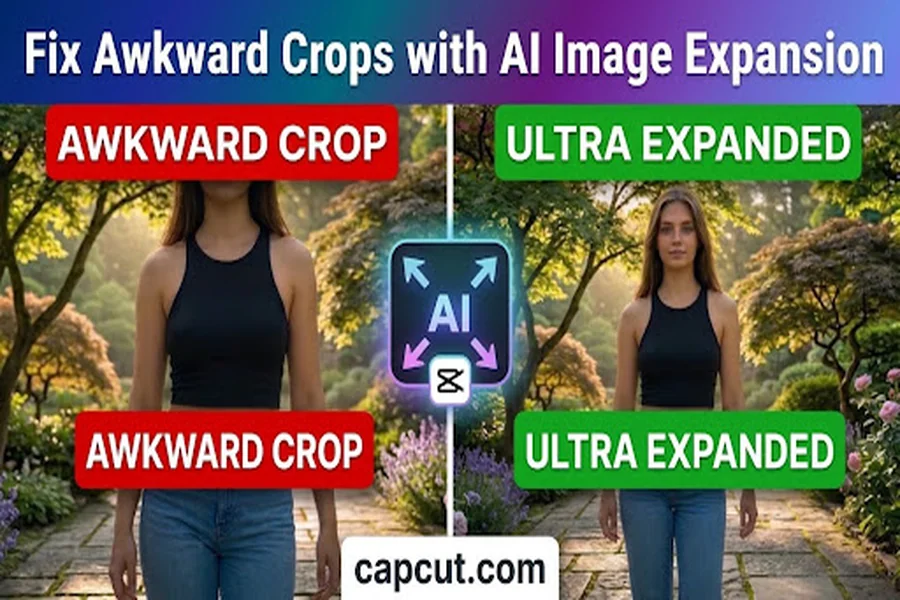
While a poorly cropped photo can ruin the whole composition, a well-cropped photo can make a great impact. An important subject is sometimes too close to the edge, part of a person is cut off, or the background does not give enough space for the desired layout. These are especially aggravating when you need to use the image for social media, website banners, marketing, or professional presentations. In the past, it was necessary to edit them, carefully resize them, and even recreate missing portions of an image manually. But Artificial Intelligence has come up with a much simpler way. AI image expansion is a function that can be used to enlarge any image and add extra visual information to each specific image in order to match the original photograph. This technology can not only be used to enlarge or stretch a picture, but also to add realistic backgrounds, add extra scenery and fill in blank spaces with the right details. From portraits to product photos, landscapes to simple snapshots, an AI image expansion tool can work wonders on transforming suboptimal images into more balanced and visually appealing photos.
What is AI image expansion?
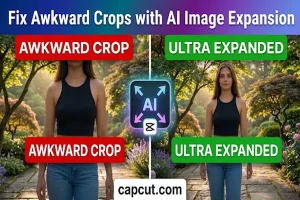
AI image expansion is an image-editing technology that extends the image’s boundaries with AI to create additional visual content. It can also be called as generative expansion or outpainting. AI expansion is different from regular resizing, which expands the image by simply stretching existing pixels. An ai expand image tool can be particularly beneficial when you want to scale an image without destroying crucial details. AI expansion is not like regular resizing, which stretches the pixels of the image, but creates additional content that fits the original image. Suppose, for instance, that you take a portrait in which someone’s shoulders are cut off. When the image is enlarged, there are additional background spaces and in appropriate situations, additional areas in the image can also be reconstructed to create a more natural image composition. The technology can also be used to extend walls, skies, landscapes, furniture, clothes and other backgrounds. It’s intended to make the larger photo seem like it was captured in a wider shot.
Why do awkward image crops occur?
Many people are not aware of awkward crops. There are a number of reasons for that, such as camera placement, aspect ratio errors, constraints of the platform itself and space constraints when taking photos. A frequent issue can be when pictures are taken too close. The photographer may accidentally truncate a man or woman’s head, hands or shoulders. Sometimes, the photograph might look nice, but be problematic to use in other formats. Yet another problem is social media sites. The size of the image varies from site to site. This image that is optimised for a square-sized post might not look as great in a vertical story or a big promotional banner. The same challenges exist with website layouts. A picture that fits well on a cell display might not fit well when seen on a desktop home page. Cropping can also take away big pieces of information, giving the whole composition an imbalance. The answer lies in the use of AI for creating space instead of having to delete more content.
AI Image Expansion addresses awkward crops
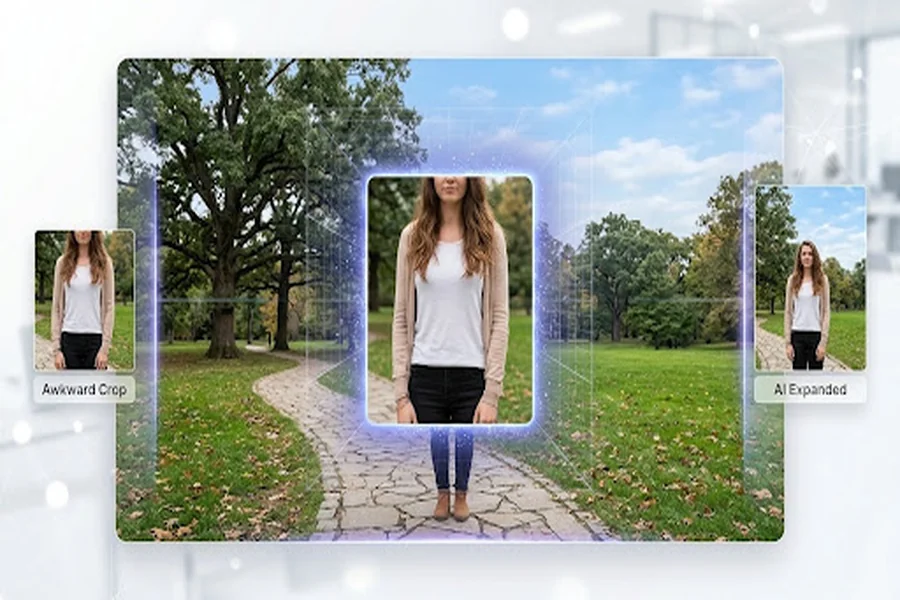
The primary benefit of AI image expansion is that it is able to generate missing visual information and not just scale the image up. The AI system analyzes the elements of the photo that you upload. Recognizes patterns, colors, textures, lighting and the relationship between the various objects. The system analyzes the photo, and then creates new content based on the areas selected. The aim is to preserve the visual uniformity with the original photograph and the expanded areas. For instance, AI can add more clouds and atmosphere to a landscape photo that has a small portion of sky. An indoor photo could expand, and continue the walls, floor or furniture. If you want to give subjects more space, you can also use an ai expand image tool to do so. This is especially helpful when taking a portrait, doing an advertisement, or taking an image of a product, where image balance is crucial. While it relies on quality of the image and the complexity of the scene, the use of AI to extend its reach can save a lot of time especially for routine editing jobs.
Tools that can be used to expand images using AI
There are a number of image editing programs that now have AI capabilities that make image expansion easier. This is up to your editing experience, what you need to edit and your workflow preference. One of the options to consider is CapCut, especially if you’re already producing social media content. It has AI-driven editing capabilities that can aid in creative photo workflows, which is advantageous when creating images for various content types. It can assist you to fine-tune and arrange images for publication, potentially making the process more efficient, depending on the features you have in your version. Generative expansion is also available in other dedicated image-editing software. Consider tools like the adjustable aspect ratio, realistic background generation, high-resolution export and easy editing controls when selecting an ai expand image tool. Also, look to see if the application offers a number of expansion attempts. The results produced by AI aren’t always perfect the first time, so it’s really helpful to be able to quickly generate another area. Don’t choose an application just because it has a lot of features, think about how easy it is to incorporate into your standard editing workflow.
Step-by-Step Guide to Fixing Awkward Crops
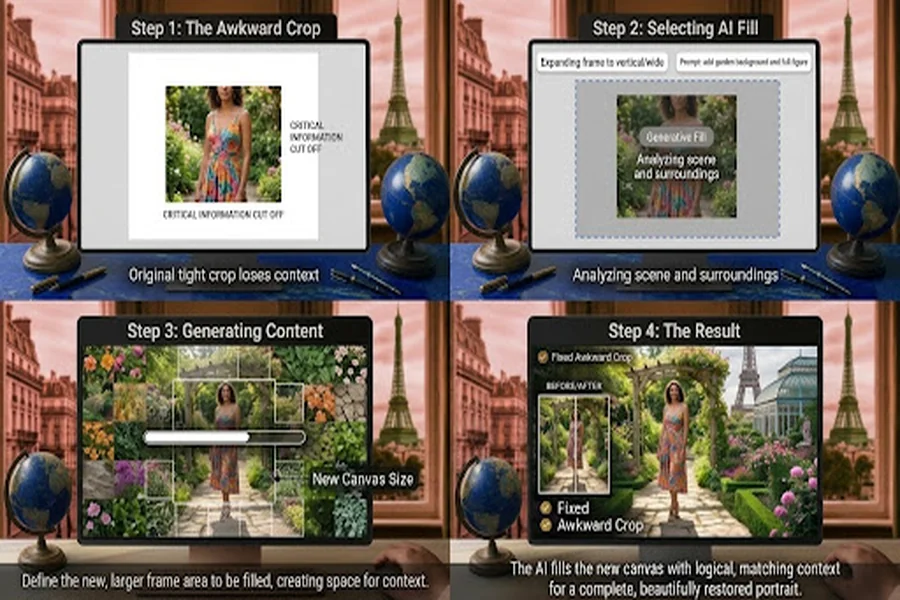
Using AI to repair an awkwardly cropped image is generally straightforward. Although individual applications have different interfaces, the basic process remains similar.
Step 1: Choose the Right Photograph
First, choose the picture you would like to work on. Good picture starts will be images with clear subjects, reasonable picture resolution, and some background information. Determine the areas in the photo that require more space. You could, for instance, extend the background over the head of a person, add space around a product or make a landscape wider. Think about the end use of the picture before editing. Understanding the dimension of the square, vertical or horizontal composition will help decide on the dimensions.
Step 2: Upload Your Image
Launch your favorite photo editor and import the photo. Some applications will enable the user to drag and drop files right into the workspace, and others will have an upload button. When the image is displayed, closely observe the image’s composition. Look for places that seem cramped or unfinished, and determine what boundaries should be extended. A special ai expand image expansion app can help with this step if it involves more canvas space, as they will give you a visual representation of what the expansion will look like.
In step 3, the Canvas Size can be adjusted
Next, you need to choose the image you want to work with and pick the size that you want. When creating a vertical social media post, you might require more space than the initial image provides on top and bottom. If you’re designing a website banner, you may want to enlarge the photo in a horizontal direction. Do not try to enlarge the image any more than is necessary. If the canvas size is too large, it may be challenging for the AI to create convincing details, especially if the image in question has intricate objects. Select size that will enhance composition without sacrificing the significance of the subject.
Step 4: Create the missing areas
Once you’ve made the canvas adjustments, you can utilize the application’s AI expansion or outpainting capabilities.The system will be used to analyse the original image and create content in the new spaces. You can submit a text prompt that specifies the desired background; this may be possible for some applications.For instance, a continuation of a blue sky or a natural outdoor backdrop or a same color backstory for the interior wall is what you can ask for. Let the system come up with its first suggestion and then determine if further changes are needed.
Step 5: Analyze and make improvements to the Result
It is essential that all AI-generated images be checked before downloading or use. Notice the light, shadows, textures, proportions of objects and continuity of background. An enlarged image can sometimes have odd shapes and details that are not found within the original photograph. If the instance seems out of the ordinary, attempt to regenerate the affected region or tweak your prompt. An superior artificial intelligence expand photo software ought to provide you with sufficient flexibility to play around with different outcomes until you end up with a Natura-like expanded composition.
In Step 6, download the Final Image
When you feel it is good enough, save the image in an appropriate format. JPEG is suitable for most common photographs and Web publishing, and PNG is suitable if you need to retain specific aspects of the image. Select a resolution that is suitable for the purpose. It is important to have adequate image quality, especially for professional websites, presentations or printed materials.
These are the best practices for obtaining natural-looking results
While AI can make expanding images simpler, the quality of the finished product is still going to rely on how you edit the image. First of all, do not expand too many areas at once. Smaller adjustments will help it to be consistent and the chances of any odd visual details will be minimised. Secondly, notice the original lighting. The created areas should be the original lighting if the photo has soft, natural lighting. A sudden change in brightness or direction of the shadows can make the expansion look artificial. Thirdly, take into account the subject’s stance. When enlarging images, the composition should be enhanced, not distract from the main subject. Another factor to take into account is background complexity. Simple backgrounds are likely to be more easily ‘extended’ than busy backgrounds with lots of overlapping elements. An AI image expansion tool can generate multiple variations in the case of a complex photo. It can be helpful to compare these results prior to finalizing your selection and possibly find a more realistic result. Last but not least, always check the size of the image in the desired display size. Sometimes minor flaws will not be readily apparent during the preview stage of the editing process, but become noticeable when the image is prominently displayed.
Common Uses of AI Image Expansion
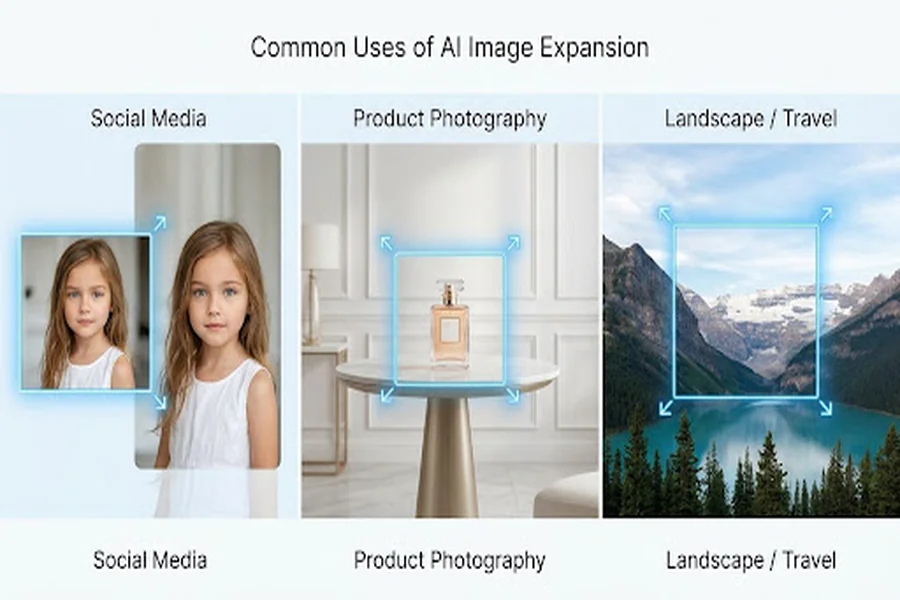
AI image expansion has various applications across many creative industries and normal image editing scenarios.
Social Media Content
Often social media producers have to adjust photos to various aspect ratios. Using the Expand tool, can enlarge an image to add more background space while keeping subjects in the image. It simplifies the process of creating graphics for posts, stories, thumbnails and promoting graphics.
E-commerce Product Photography
Beautiful pictures of products are essential to online retailers. Some images of products are, however, taken too close, and have limited background space. With the help of AI, more balanced product compositions will be created, which can be suitable for different designs on the website and in promotional material.
Images for use on websites and blogs
Articles for the blogs and web banners need large images. If the original image is too small then adding some extra space to the background can help add the necessary dimensions without taking away from the main subject of the photo.
Portrait Photography
Expansion can be utilised by portrait photographers in order to frame their subjects better, offer more headroom and space around the people. But, it’s important for users to closely watch the facial and body features created to make sure they still look natural.
Marketing and Advertising
Images need to be in various formats for advertisements, presentations and promotional campaigns frequently, as well. Using an ai expand image tool can be useful to make modifications to photos to fit these requirements without compromising the overall look and feel of the image.
Some of the common mistakes made in this problem are given
Many people have the incorrect notion that AI can fill in all the missing information flawlessly. While it is possible to create impressive imagery with modern systems, most of the times they are not able to capture exactly the same scene from which they have been shot. If an AI’s image is cropped to show a complex scene, there’s a possibility that the AI will extend the image in a realistic way but not accurately recreate the original object. Another error is of over-expansion of images. If you have a lot of expansion, you can get some strange textures, backgrounds and proportions. Users should not also neglect to consider resolution of images. The enlargement of a poor quality photograph cannot recreate all the information in the original photo. The areas produced can be in varying sharpness or clarity.Lack of specific directions can also have an impact on the outcome. If an app has text prompts, make sure to specify background and visual style. The generating process can be steered by specifying some instructions. Finally, don’t forget to review that at the end! Whether you’re using a helpful ai expand image tool or just any other kind, it takes a human touch to make sure that the photo that comes out is what you want.
AI tools offer several benefits over traditional editing, including
Most photo editing involves having to know about layers, masks, cloning, and other selection techniques. The techniques that can be used can generate great results, but can be quite time-consuming and may take practice. AI image expansion makes many of these easier, by helping to create additional visual content automatically. It’s also very convenient. Anyone can try out the enlargement of images without having to master some esoteric editing skills. Another benefit will be the flexibility. Existing images are more adaptable, as different aspect ratios can be created from the same picture by the user. AI may also prove useful in saving time with a huge amount of photographs. Rather than manually creating all backgrounds, the editors can take advantage of the ability to automatically generate all backgrounds and make adjustments as needed. For content creators, small businesses, bloggers, and photographers, as well as those consistently handling digital images, an AI image tool can be of immense assistance.
Expand your images with AI
As AI image editing keeps evolving and expansion technology becomes a key component in the creative process, it has become an essential tool for any creative professional. Future enhancements could provide more consistent lighting, increased object recognition capabilities, improved lighting quality (including greater control over expanded lighting areas), and improved texture generation. Further, we will likely see more image expansion applications that incorporate other AI capabilities, like background removal, object replacement, image enhancement and automatic resizing. Such developments may help those who don’t have a lot of experience in photo editing to make professional-looking tweaks to their pictures.
Conclusion
Don’t despair if the photos end up looking awkward in the crop. If the photos look bad when cropped, it’s not the end of the world or the end of the photo. By leveraging AI image expansion, users can effectively expand their images and backgrounds, as well as enhance image composition, while minimizing the need for extensive manual work. This technology works well with various applications on social media, which can be used in various ways depending on their requirements, such as creating graphics, product photography, portraits, and website banners. Natural-looking results can be obtained by carefully selecting the application, canvas, generated details, and making refinements to the imperfections. From novice to advanced, an AI image tool can prove to be valuable to your creative process, whether you’re just getting started with photo editing or you already have some experience and want to save time. It’s all about leveraging AI as a tool to edit, taking the assistance of AI with your own creative instinct, and creating balanced, realistic, and appealing images.