
Creating Custom Prosthetic Design Concepts from Patient Reference Images with AI
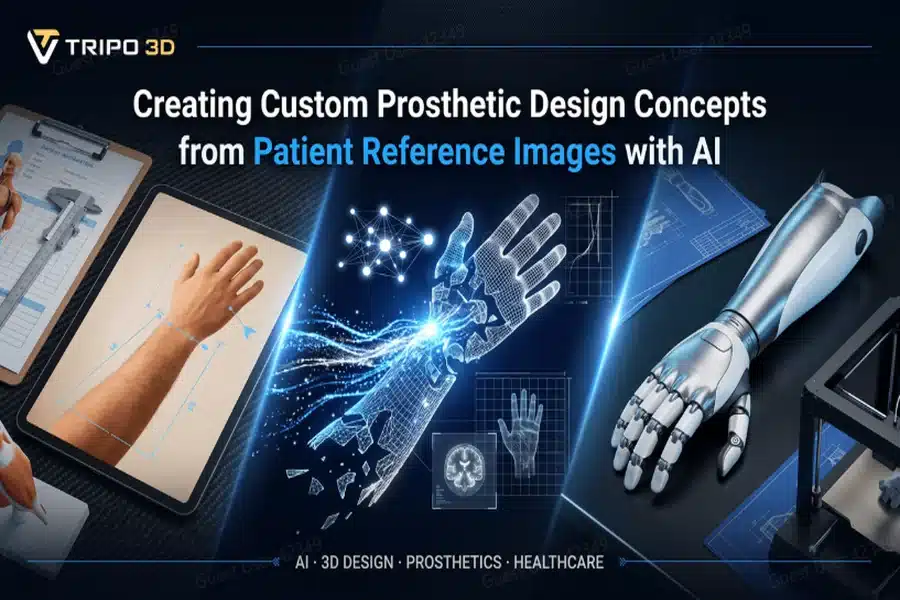
Creating Custom Prosthetic Design Concepts from Patient Reference Images with AI
The unique needs of an early-stage assistive design visualization are not limited to medical professionals. Prosthetic designers need to create visual representations of ideas before actual production and testing, whether designing concepts for the upper limbs, lower limbs, or concepts for general assistive devices.
Traditionally, developing a design concept for a prosthetic was a long and costly process of back-and-forth designing through lengthy modeling processes, a range of software packages, many different prototypes, etc. Tripo 3D has changed how designers visualize new concepts at the beginning of their design processes.
Through the use of image to 3D creation techniques, users can turn either patient images or visual concepts into 3D models and use them to collaborate on and explore ideas effectively and cooperate on the creation of new designs.
Below is an example of how workflows powered by artificial intelligence (AI) will assist development teams in reducing the timeline of custom prosthetics concept development.
When personalization leads to better design
No two patients are ever the same. A person’s anatomy, lifestyle, preferences, and functional requirements can all impact how a prosthetic should be designed. Because of this, prosthetic designers often need to come up with customized concepts instead of standardized templates.
Having a visual representation of the ideas early in the development stage can help designers and teams alike consider the look, function, and feel of a design. Tripo 3D allows designers to create a prosthetic design concept more quickly from reference images than traditional design methods.
Why manual concept modeling can hinder innovation
Developing the concepts behind prosthetic design usually involves the following workflow:
- Gathering reference materials
- Building a digital model
- Creating desired shapes and surfaces
- Generating a clear picture for presentation
- Preparing the file for discussion
Though all of the above can result in a desired output, it requires a lot of time and skill. Multiple different ideas may result in teams taking an abundance of time to complete each and every design from start to finish which can become an enormous bottleneck for designers.
Tripo 3D speeds up the early phases of the design workflow by generating the models from reference images with reduced user effort.
From visual reference to idea discussions
A lot of reference images contain unique information that can inspire brand new ideas and solutions. A design team may have sketches, patient approved concepts, anatomical images or references that simply communicate the needs that must be addressed.
Rather than rebuilding these ideas manually, Tripo 3D converts these references into 3D models which may be analyzed and adjusted accordingly. This allows individuals discussing the designs to gain a clearer picture of the ideas.
Creating a shared visual language between teams
Collaboration between teams is often necessary for efficient design project completion. Healthcare professionals, engineers, designers, and decision makers all require clear visualization of a design. Using a three dimensional model offers a point of common ground which ensures all involved in a project are able to make effective discussion and share ideas.
Tripo 3D not only gives all involved the tools needed to make better presentations of their design concepts but also helps cut down the time it takes to produce one.
Intelligent modeling supports human-centered innovation
3D AI is quickly advancing and is helping design teams move forward by simplifying model creation. AI driven modeling is not here to replace human designers. Rather, AI will help speed up the process by automating some of the manual tasks designers are typically accustomed to.
This will free up the designers to focus on decision making, personalization, and evaluation, whereas the software helps them create models more quickly. This allows a company or an organization to focus on optimizing concepts rather than producing complex models.
Users will gain time and produce 3D models quickly to get them to the stage of exploration and further development.
Patient inspired reference to 3D model in 4 simple steps
Once a reference image is ready, Tripo 3D allows you to generate a 3D model quite easily.
Step 1: Choose input and upload
First, access the Tripo AI workspace and choose your generation method. Next, upload your reference image(s) from a local folder or your file system (you can use JPG, PNG or WEBP images). Image-based generation is perfect when you need to visualize a concept from sketches, references or image representations of a concept to guide a design idea.
Step 2: Configure settings
Then, specify your generation parameters based on your workflow’s requirements. You will be able to customize mesh quality to help capture the most detailed design features and choose texture options to generate presentation-ready visuals that can aid in communication of your concept or idea to your clients and team members.
Step 3: Generate and refine
After you generate a 3D model, Tripo 3D has multiple built-in modeling tools that will assist in further refinement and perfection of your models. Improve textures with the Magic Brush tool, isolate components through the extraction of an asset, or add other modifications necessary for improving your design concept.
Step 4: Export
Finally, you can export your 3D model in a variety of formats depending on your individual needs for downstream use, such as file formats for digital rendering, file formats ready for import into specific CAD software, or even for preparation for 3D printing. Tripo 3D supports STL, OBJ, FBX, GLB, and USD formats.
Explore ideas faster before moving to development
One benefit of 3D AI modeling is that you are now able to explore ideas and different concepts faster than ever before. Designers will have the ability to quickly create various prototypes to present to clients to understand which concept is the best. This allows for rapid brainstorming and concept generation.
Tripo 3D reduces the time and complexity that are needed to create and edit concepts, helping designers explore more options and speed up the concept process.
From image to STL, more accessible
In most cases you will need an image to STL or similar model to continue work on the design in other CAD software or to simply share your concept. While previously this was a difficult task requiring many steps and additional programs, Tripo 3D streamlines this process and allows you to achieve that file format quickly from the reference image that inspired it.
AI powered concepts will bring you value in many fields:
Assistive technology development
Teams can use a reference to model a new concept or analyze a proposed idea to ensure they are going down the right path of design to develop their product.
Educational and research purposes
Students will be able to easily create 3D models for their research projects and presentations that support visual learning.
Stakeholder communication
Communicating design concepts to individuals who may not be experts can be challenging, but 3D models offer a common ground for everyone to analyze and discuss a design concept.
Product innovation workshops
With rapid modeling capabilities, organizations can foster more collaboration within teams during brainstorming or workshop sessions and identify strong design ideas more quickly.
Custom design made easy with accelerated creative workflows
A design concept for a prosthetic can start with a simple visual idea, a reference image, or a drawing. Getting this concept visualized in a 3D model that you and others can evaluate, adjust, and improve upon traditionally requires several tools and hours of tedious work.
Using Tripo 3D, you will be able to quickly turn visual references into sophisticated 3D models that may be refined with easy-to-use features and exported for further development of the design.
Ready to begin transforming your own custom design ideas faster than ever? Try Tripo 3D today to start turning inspiration into detail-oriented 3D concepts.