How to Remove Beard from a Photo for Clean and Natural Portrait Edits
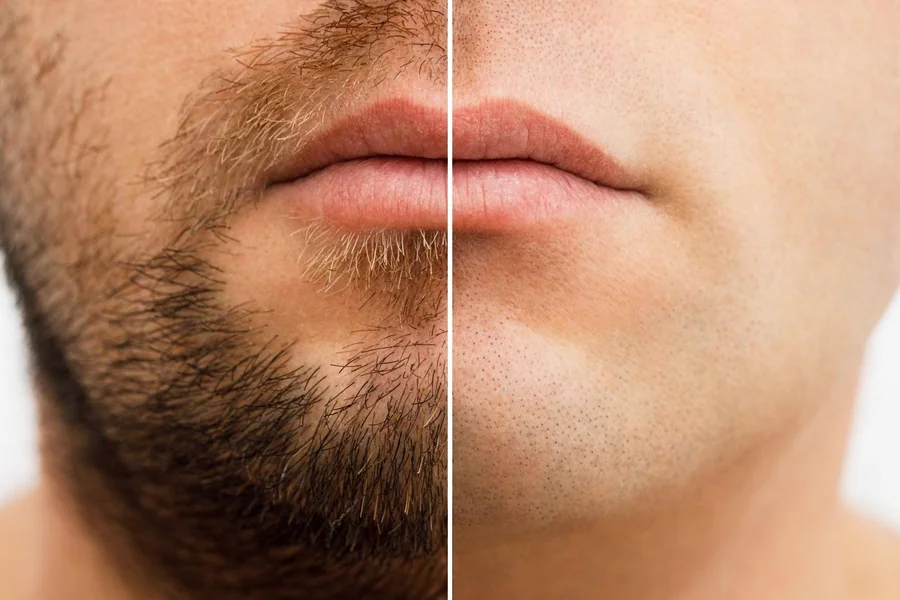
Portrait editing has come a long way in recent years. What once required hours of work in professional photo editing software can now be done in just a few clicks. One of the most common requests in portrait retouching is removing facial hair, especially beards, to create a cleaner, more polished look. Whether you want to see how you would look without a beard, prepare a professional headshot, or simply experiment with your appearance, modern AI-powered tools make this process surprisingly simple and accurate.
If you have ever searched for a quick and hassle-free way to edit your photos, you will be glad to know that you can now remove beard from photo online using smart AI tools that handle the entire process automatically. These tools analyze the facial structure, detect the beard area, and replace it with natural-looking skin that matches the surrounding tone and texture. No manual selection, no complicated settings, and no design experience required.
Why People Want to Remove Beards from Photos
There are many practical and creative reasons why someone might want to edit out a beard from a photo. Understanding these reasons helps explain why this type of tool has become so popular.
- Professional headshots: Many workplaces and professional platforms prefer clean-shaven profile photos. Editing a beard out of an existing photo saves time and money compared to scheduling a new photoshoot.
- Visualizing a new look: Before actually shaving, many people want to see what they would look like without facial hair. A photo editor makes this possible without any real commitment.
- Social media and dating profiles: A clean-shaven look is often preferred for certain types of profile photos, and editing tools allow users to update their images quickly.
- Creative projects: Designers and content creators sometimes need to modify portraits for artistic or commercial purposes.
How AI-Powered Beard Removal Works
Modern beard removal tools use artificial intelligence and machine learning to detect and remove facial hair with impressive accuracy. Here is a general overview of how the technology works behind the scenes.
Facial Detection and Mapping
The AI first scans the uploaded photo to identify the face and map out its key features, including the jawline, chin, upper lip, and cheeks. This mapping helps the tool understand exactly where the beard is located and how it interacts with the surrounding skin.
Beard Segmentation
Once the face is mapped, the AI segments the beard area from the rest of the image. This step involves distinguishing between beard hair and skin, which can be challenging in photos with complex lighting or shadows. Advanced models handle this with high precision.
Skin Texture Reconstruction
After removing the beard, the tool fills in the area with realistic skin texture. It samples the surrounding skin tone and texture to ensure the result looks natural and seamless. The goal is to make it appear as though the person never had a beard in the first place.
Tips for Getting the Best Results
While AI tools are highly capable, a few simple practices can help you get the most natural-looking results when removing a beard from a photo.
- Use a high-resolution photo with good lighting. Clear images give the AI more detail to work with.
- Choose a photo where the face is clearly visible and not partially covered or turned at an extreme angle.
- Avoid photos with heavy shadows on the lower face, as these can make skin reconstruction less accurate.
- Use a front-facing or slightly angled portrait for the best outcome.
- After the edit, review the result carefully and use any available touch-up tools to refine specific areas if needed.
What to Look for in a Good Beard Removal Tool
Not all online photo editors offer the same quality of results. When choosing a tool for beard removal, consider the following features.
Ease of Use
The best tools require no technical knowledge. You should be able to upload a photo, let the AI do its work, and download the result within seconds.
Natural Output Quality
Look for tools that produce smooth, realistic skin in the edited area. Blotchy or uneven results are a sign of lower-quality processing.
Privacy and Security
Since you are uploading personal photos, make sure the platform has a clear privacy policy and does not store or misuse your images.
Additional Editing Features
Some platforms offer extra tools like skin smoothing, blemish removal, and background editing alongside beard removal. Having these features in one place saves time and effort.
Conclusion
Removing a beard from a photo no longer requires professional editing skills or expensive software. Thanks to AI-powered tools available online, anyone can achieve clean, natural-looking portrait edits in just a few steps. Whether you are updating a professional headshot, exploring a new look, or working on a creative project, these tools offer a fast and reliable solution. The key is to start with a good quality photo and choose a platform that delivers realistic, seamless results. With the right tool, your edited portrait will look completely natural and polished.